


It’s 6 PM. You’ve closed 12 tabs, updated three tickets and answered a swarm of Slack pings. By day’s end, you’ve completed key projects, updated your progress and managed your tasks by optimizing workflow for maximum productivity and balance. All this is made possible with the practice of time tracking.
What is time tracking? Not the punch-in, punch-out kind — but the kind that helps Agile teams spot scope creep, balance workloads and make better sprint estimates. Its something that provides valuable insights into how time is utilized, measured either manually or through digital tools. In today’s frenetic work environment, time tracking is a crucial policy to master.
According to Harvard Business Review, professionals only spend about 2.8 hours per day on high-value work — the rest gets eaten up by distractions, admin or poorly planned tasks.
In this guide, we’ll dive into why time tracking matters, how to track employee work hours without micromanaging, the benefits of employee time tracking and how tools can help, without getting in the way of actual work.
What is time tracking?
Time tracking is the practice of recording how much time is spent on specific tasks, projects, or activities — but in the Agile world, it’s more than just a timesheet.
It’s about understanding the story behind your sprint hours (short, time-boxed work cycles in Agile, typically lasting 1–4 weeks, where teams focus on completing a defined set of work). How long does a bug fix usually take? Are code reviews eating up more time than expected? Are your epics (large bodies of work that can be broken down into smaller tasks or user stories) bloated with hidden tasks?
What is time tracking software? It’s a visibility tool that helps product managers, scrum masters and team members see how effort flows through their backlog and whether that effort is delivering value.
Benefits of time tracking for businesses
Time tracking enables better workload management. It allows you to break down tasks according to time intervals so you can delegate, automate or reschedule them as needed. Below are some of the practical benefits of employee time tracking that directly support better planning, decision-making and team productivity:
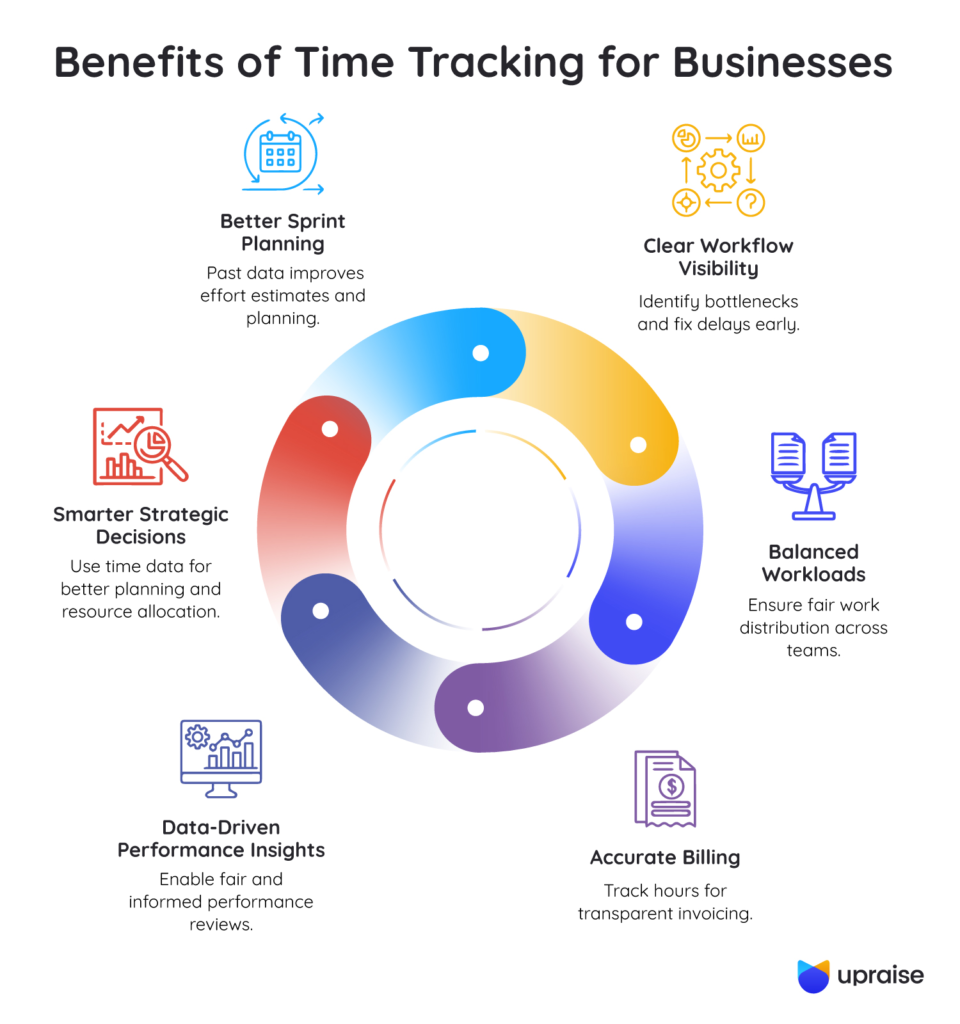
1. Improved sprint planning and estimation
By analyzing how long tasks typically take across past sprints (short, time-boxed development cycles), teams can forecast upcoming work with greater accuracy and avoid underestimating effort.
For example, if story-point estimates for bug fixes consistently fall short, teams can recalibrate their estimation model. This leads to better sprint capacity planning and reduces rollover work.
2. Greater visibility into workflow bottlenecks
It helps identify areas where work slows down, whether it’s extended code reviews or delays in QA, so teams can address the root cause early.
If QA consistently takes twice the time of development, it might indicate a need for better test automation or clearer acceptance criteria.
3. Balanced workload distribution
Consistent time data allows managers to assess if certain individuals are carrying disproportionate workloads. Time data helps balance work more equitably across your team, avoiding burnout and resentment.
For instance, if one developer logs significantly more hours on high-complexity stories while others are focused on routine tasks, the team can rebalance in the next sprint to prevent fatigue and improve morale.
4. Transparent and accurate billing
For client-facing teams, tracked hours provide clear records for invoicing, especially when the scope expands mid-project or work spans multiple epics (larger initiatives broken into smaller tasks).
Say a UI redesign took 25% longer due to client-requested changes mid-sprint — time tracking ensures those extra hours are accounted for and billed appropriately.
5. Fact-based performance insights
Rather than relying on assumptions, managers can refer to tracked data when discussing team performance, velocity and capacity, leading to more constructive and fair conversations.
For example, if a front-end developer consistently completes 8-point stories within the sprint while another struggles with 5-point stories, it opens up a constructive discussion: Does the second developer need support? Are the tasks under-scoped? This clarity leads to more meaningful retrospectives and fairer one-on-one conversations.
6. Stronger strategic decisions
When leaders understand where team time is invested, it becomes easier to evaluate project priorities, allocate resources wisely and set realistic growth targets.
Time data reveals where most of your team’s effort is going — core feature development, bug triaging, support tickets, or internal meetings. If too much time is spent on non-customer-facing work, leadership can re-evaluate resource allocation and roadmap priorities.
Time tracking brings clarity to complexity and offers a grounded view of how your team operates.
How to track time effectively
Knowing the benefits of employee time tracking is one thing, but making it work without slowing your team down is another. Here’s how to track time in a way that’s useful, respectful and helps your team perform better:
1. Choose the right time tracking tool
Look for a tool that fits seamlessly into your team’s daily environment — whether that’s inside a project management tool like Jira or alongside it. The less friction there is in logging time, the more likely your team is to do it consistently.
How UpRaise helps: If your team uses Jira, UpRaise for Employee Success integrates seamlessly, letting team members log time within Jira issues, tied directly to goals or OKRs (Objectives and Key Results). This keeps tracking contextually relevant and friction-free.
2. Break down work into manageable tasks
Smaller, clearer tasks are easier to track and estimate. Instead of tracking time on broad to-dos like “Build feature X,” break it down into parts like “API integration,” “UI design,” or “QA testing.” This gives you clearer data and helps pinpoint where time is really being spent.
How UpRaise helps: Use UpRaise to link each Jira task to align objectives and track how much time is spent on each user story. This helps identify where certain epics (large bodies of work) consume more effort than planned.
3. Encourage daily time logging
Waiting until the end of the week to log hours often leads to vague estimates and forgotten tasks. Logging time daily — even if it’s just a few notes — keeps the data accurate and makes team activity more visible in real time.
How UpRaise helps: UpRaise provides timely reminders within Jira to log work hours and update progress, so your team doesn’t rely on end-of-week guesswork.
4. Set expectations — but don’t micromanage
Be transparent about why you’re tracking time. Emphasize how it helps improve sprint planning, spot blockers and support the team, not monitor their every move. When done right, time tracking builds trust, not tension.
How UpRaise helps: Managers can view time data across teams and goals in UpRaise dashboards, gaining visibility into effort trends without needing to ping individual contributors.
5. Review and reflect on time logs
Use retrospectives to go beyond “what got done” and explore how much effort it took. Did some tasks take longer than expected? Was there a dependency or delay? These insights help teams adjust planning and spot recurring pain points.
How UpRaise helps: The UpRaise Feedback module lets you tie time insights to regular feedback loops, so discussions during retros can include data-backed context, for example, identifying blockers or underestimated tasks.
6. Tie time tracking to team goals
When time tracking is connected to broader goals or key results, it becomes more meaningful. Instead of tracking time just to check a box, teams can see how their effort contributes to business outcomes or sprint health.
How UpRaise helps: Because UpRaise links Jira issues to OKRs, you can easily view how much time went into achieving each key result, helping teams see not just what got done, but how much effort it took.
Tracking time isn’t about clocking in and out; it’s about giving your team the clarity to plan better, work smarter and improve with every sprint.
Top time tracking tools
There’s no shortage of tools out there, but choosing the right one depends on your workflow, team size and how deep you want to go with time tracking.
Here are some of the top tools in the industry:
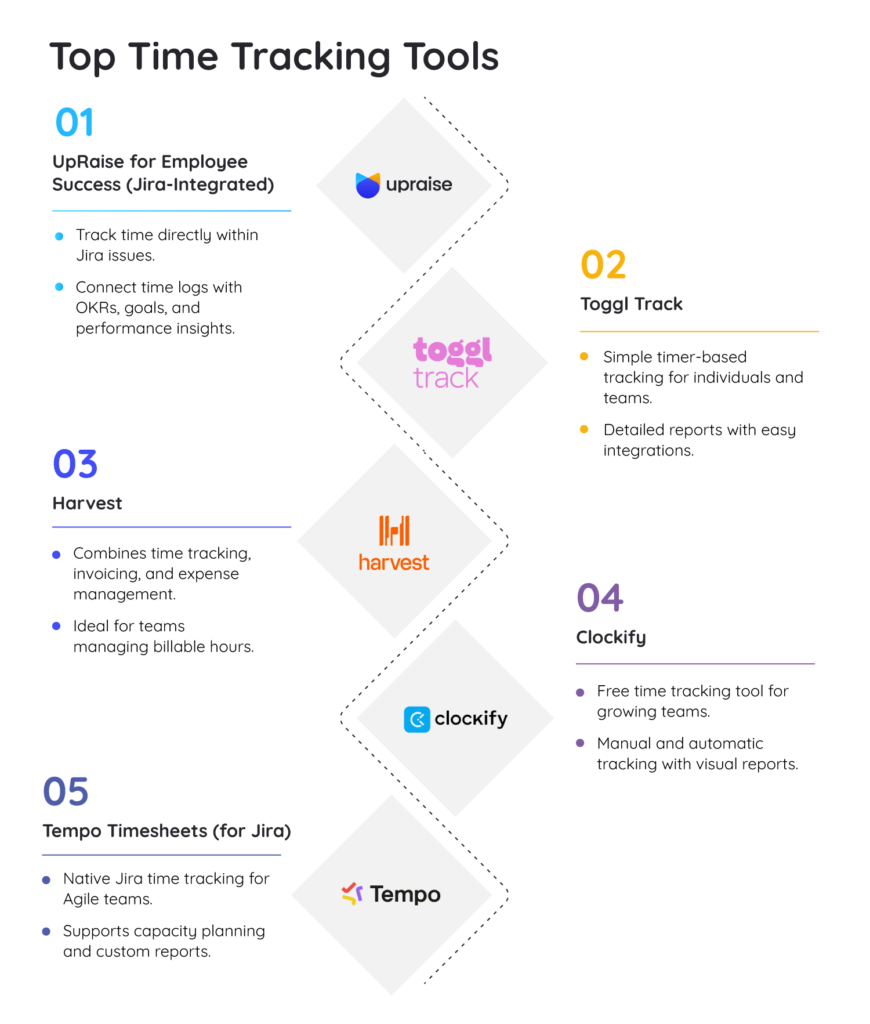
- UpRaise for Employee Success (Jira-integrated)
UpRaise goes beyond basic time logging. It connects tracked hours with OKRs (objectives and key results), performance goals and Jira issues, making time tracking meaningful.
Here’s how UpRaise adds depth to time tracking:
- Track time within Jira issues, without switching tools.
- Connect time logs to individual and team-level goals, so you see not just hours worked, but progress made.
- Use dashboards and reports to identify underperforming areas, track velocity across sprints and adjust workloads in real time.
- Integrate feedback loops, enabling managers to use time data for more informed check-ins and performance discussions.
For Agile teams already working in Jira, UpRaise works as a decision-support system that blends effort visibility with goal achievement.
- Toggl Track
A flexible timer-based tool ideal for individuals and startups. It offers idle detection, detailed reports and simple integrations — perfect for those new to how to track employee work hours.
- Harvest
Combines time tracking with invoicing and expense management. Useful for agencies that need to log billable hours and convert them directly into invoices.
- Clockify
Great for growing teams looking for a free solution. It supports manual and automatic tracking, plus it offers visual breakdowns for reviewing time spent by task or team member.
- Tempo Timesheets (for Jira)
Geared toward Agile teams inside Jira, Tempo helps track time directly within issues and build custom reports for capacity planning.
The best tool is the one your team will use — one that captures hours and the story behind the work. Whether you’re after simplicity or deep insight, the right fit makes all the difference.
Best practices for time tracking
A few thoughtful habits can make a big difference in utilizing time tracking data and maximizing your benefits. These include:
- Break down large tasks into smaller, time-trackable units like user stories.
- Use time tracking software that integrates with your existing toolset (like Jira).
- Encourage team members to log time daily to avoid estimation gaps.
- Clarify how to track employee work hours — focus on transparency, not control.
- Use time data in retrospectives to refine sprint planning.
- Track time in relation to goals to measure both effort and impact.
- Regularly review time logs to identify trends, blockers, or underused capacity.
Getting these basics right ensures your time tracking efforts support better planning, fairer workloads and smarter business decisions.
Conclusion: Why time tracking is worth your time
Time tracking improves your workflow and saves you time. When teams understand where their time goes, they can estimate better, collaborate smarter and make decisions grounded in reality.
From breaking down complex epics into trackable tasks to learning how to track employee work hours without friction, the techniques shared here are designed to help you build a healthier, more focused workflow — one sprint at a time.
And if your team already works in Jira, UpRaise helps you go a step further. By connecting time logs to goals, issues and feedback, UpRaise provides real context behind the effort, giving both team members and managers the clarity they need to grow and deliver.
Experiment, observe and adapt — because when your time has purpose, your progress has direction.
FAQs
How does time tracking benefit businesses?
Time tracking helps teams plan better by providing insights into how work hours are spent across projects and roles. Accurate forecasting, efficient resource allocation and smarter decision-making lead to improved project delivery and business performance.
What are the best tools for employee tracking?
Popular options include Toggl, Harvest, Clockify, Tempo and UpRaise. For teams working in Jira, UpRaise stands out by tying tracked time directly to goals, OKRs and performance, giving time data more meaning and context.
How can time tracking improve employee productivity?
It brings transparency into where effort is being invested and highlights recurring bottlenecks or inefficiencies. With this awareness, teams can make targeted changes, redistribute workloads and focus more on high-impact tasks.
What are the key features to look for in time-tracking software?
Look for tools that support detailed task-level tracking, integrate easily with your project management system (like Jira) and offer clear reporting dashboards. Features like goal alignment, real-time logging and feedback support add even more value for Agile teams.

