

Before understanding what GTD means, let’s imagine a small scenario.
You’re sitting down at your desk in the morning with a coffee in hand, ready to take on the day. However, within minutes, your system floods with emails, and a teammate pings you for an update. Your mind jumps to three different tasks you forgot to finish yesterday. Suddenly, you’re overwhelmed because you don’t know where to start.
What you need is clarity of thought to get things done systematically.
When you’re fully present in whatever you’re doing, time disappears. You feel focused, calm, and in control. But even for many high-performing professionals, this state feels rare.
According to productivity expert David Allen, the cause for this lies in how we approach modern work. We don’t have a reliable system to manage everything on our plates. This observation sparked a powerful question for Allen: What if we can all build a system for ourselves that brings clarity and control in the middle of chaos?
This simple idea set the basis for what we now call the Getting Things Done (GTD) method. Let’s understand how to use this method correctly to create a clear, actionable workflow, even in the middle of chaos.
What is GTD?
GTD is a stress-free productivity hack developed by David Allen for professionals struggling to attain mental clarity and organize their daily lives.
It provides simple practices to capture and organize your tasks in an external system so that you know exactly what to work on and when. With an increased sense of control, you declutter your brain and become able to concentrate on execution rather than remembering every single task that crosses your mind.
How GTD works?
GTD is commonly perceived as a productivity tool that organizes your tasks. However, it can also help you stay organized in your everyday life. It does this in three main ways:
1. Removing indecision
According to a study on indecisiveness in business, indecision is a productivity killer. The inability to make a decision can put your business’s success, revenue, resources, and competitive advantage at risk. As GTD simplifies your “next steps” ahead of time, you act decisively, without any brain fog moments.
2. Reducing cognitive load
Just like RAM in computers, our brain can process information at a limited memory capacity at a given moment. Primarily, our brain thinks about tasks that are still pending or were interrupted in the past. You lose valuable working memory processing them instead of concentrating on the present.
The Getting Things Done method assures you that all those random thoughts are organized for future analysis. That’s how it frees your working memory and lowers the cognitive load you carry throughout the day.
3. Clearing brain clutter
GTD means externalizing mental clutter, which wastes your brain’s cognitive power. When you gather every thought in a physical or digital place, you save mental space and energy trying to remember them. This improves your ability to do more knowledge work every day.
Now let’s learn how to use the GTD method to achieve peak productivity.
Steps to implement GTD in your daily routine
Whether it’s about your personal or professional life, here is how you can use the GTD framework to declutter your brain and direct your time and energy in the right direction.
Step 1: Document everything that has your attention
Capture everything that crosses your mind in any physical or digital space to organize it later. It’s like maintaining a backlog in Agile. Instead of holding everything in your head, you document it for prioritization in your next sprint.
What type of information should you capture? Well, it can be tasks, events, ideas, book recommendations, or things you want to do someday in the future.
Step 2: Clarify what it means
Now, it’s time to convert everything you’ve captured into actionable steps. Go through each item and add as much information as you can to avoid puzzling over it later.
For instance, instead of “Project Chad,” type “Email Chad with project updates and next steps,” and include things to describe in the report.
Step 3: Organize your tasks
To organize your tasks, set reminders, add priority labels, or specify someone for commitments. There are different ways to organize tasks with labels as follows:
- One-off tasks: Tasks that take more than two minutes but require only one step (e.g., replying to emails, renewing a software license)
- Projects: Tasks that require multiple steps to complete (e.g., analyze client requirements, do QA of the code)
- Areas of focus: Tasks that don’t fit either in your professional or personal domain (e.g., launching a website, creating a YouTube channel)
- Action list: Tasks with clear steps to follow eventually, but not now (e.g., putting together a team activity menu for next Saturday)
- Tasks with due date and/or time: Tasks with a specific due date or time (e.g., send the project proposal to Harold before Friday, 5 pm)
- Agendas: Tasks you want to bring up with someone in the relevant agenda (e.g., discussion with the marketing team for the product launch due next month)
Note: Remember, the aim is to create a simple system to follow through. So, refrain from creating labels for everything. The fewer labels you have, the simpler this will be.
Step 4: Engage
Once your GTD is ready with actionable items organized into logical categories, it’s time to engage with work. Logically, prioritize tasks that you must complete today or should start to finish this week or any week in the future.
Use performance management tools to turn your GTD insights into real-time, trackable actions. You can try UpRaise for Employee Success to bring those action items into your team’s daily workflow. Since it integrates directly with Jira, you can align your personal task clarity with team sprints, objectives, and real-time feedback.
Step 5: Reflect
Periodically review your action lists and calendar to see what you’ve accomplished and what’s left undone. You can do it both on a regular and a weekly basis.
You can check out UpRaise for Employee Garrison to pull data from Jira and display it within the calendar so that you never miss any important tasks.
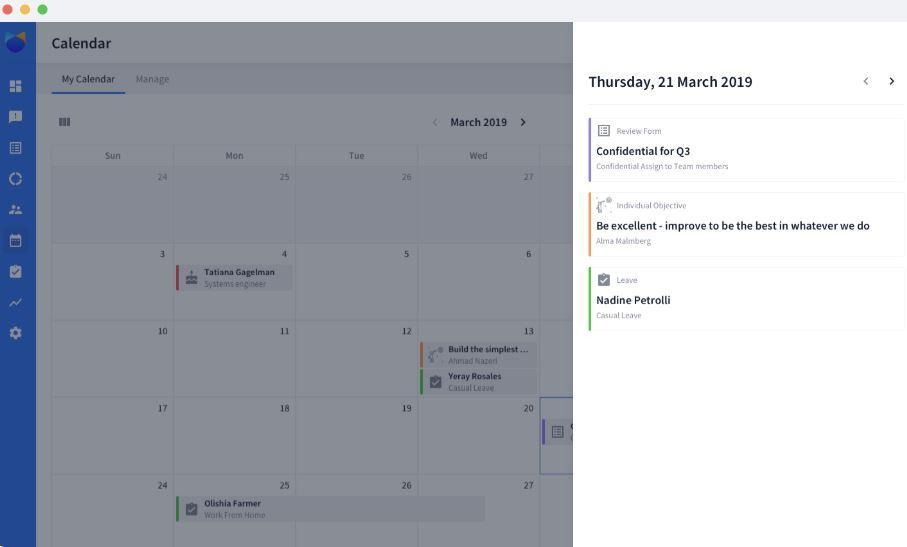
You can also use it to organize tasks, ideas, and projects with required labels for upcoming weeks in advance.
Benefits of GTD for personal and professional productivity
GTD has been an unbeatable hack for many since 2001. Those who apply this method in their work and life get to experience some amazing benefits. Let’s go over a few:
Stress-free productivity
The fundamental principles of GTD aim to help you manage professional chaos in a calm and organized manner. As you capture everything in a trusted system, you get instant clarity and empty your mind for more creative tasks at the workplace.
Additionally, the power to review your most important to-do tasks regularly gives you a sense of confidence that everything is under control.
Vertical perspective of work
GTD makes you question every thought for clarity during the reflection process. That’s how it teaches you how to separate critical tasks from shallow works that kill your productivity. Gradually, you also learn how to work consciously to move towards achieving your goals within a framework that defines your principles.
For team leaders and HR professionals, GTD can improve team-level performance and help employees adopt clarity and accountability. Your weekly reviews can double as sprint retrospectives, offering a space to reflect on work done and realign priorities.
Time to enjoy family, friends, and hobbies
GTD doesn’t distinguish between your personal and professional life. When harnessed properly, it frees you from the anxiety of trying to maintain a balance between both worlds.
For instance, you no longer have to worry about pending emails while enjoying a hike with your friends on a fine Saturday. You know that all your thoughts are parked in a system with clear next actions and reminders.
Conclusion
Start small. Externalize a thought, create a single action list, or reflect for just five minutes. Over time, these micro-habits will build a culture of focused execution and continuous improvement. Understanding GTD means creating mental clarity and focus in a world full of distractions.
Managers everywhere are using the GTD or Getting Things Done method to organize their work and personal lives. You can organize weekly sprint tasks into actionable labels via Upraise in Jira, streamline your reviews, and boost team efficiency. Start using GTD now to stay present and purposeful.
FAQs
1. What does GTD mean?
GTD means Getting Things Done in productivity methodology. It’s a framework developed by productivity expert David Allen, teaching you how to approach your life and work. It gives a simple system to collect and arrange tasks in a way that reduces workload and improves productivity.
2. How can GTD improve my productivity?
GTD allows you to focus only on the task at hand right now without thinking about what to do next. Its fundamental principles aim at removing every single thought from your mind that is irrelevant right now. As a result, you end up doing more in less time.
3. What are the steps to implement GTD (Getting Things Done) in my routine?
Capture everything you consider unfinished in a trusted place, outside your head. Then you define what each commitment is and decide your action towards it. If the stuff doesn’t make any sense, you can either trash it or add it to the ‘Someday/Maybe’ list to reflect upon later. Finally, organize the results on which you choose to work or reflect in the future.
4. How does GTD differ from other productivity methods?
While most productivity methods are about doing more, GTD is all about thinking better. For example, the Pomodoro technique focuses on timed focus intervals, and the Eisenhower Matrix prompts you to prioritize tasks. However, GTD gives you clarity on what to do based on where you are, as if you’re in control of your time and energy.

